Just follow the steps listed bellow and check the screenshot image (if you need click on it to enlarge).
Step 1 Open a web site:
http://freeproxylist.org/en/free-proxy-list.htm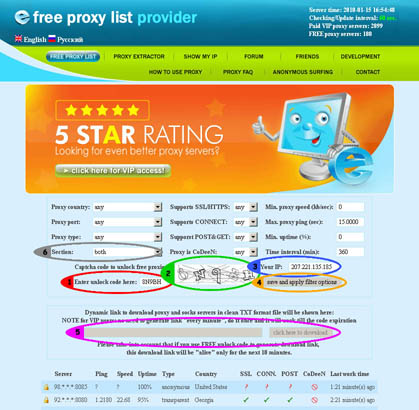 Step 2
To see proxy servers on the page and to generate personal download link you will need
unlock code.
- Case 1: If you are VIP member then your VIP password is your unlock code.
- Case 2: If you are FREE member then 5 chars shown on the picture will be your unlock code (section 2, green circle).
If you are FREE member do not forget to select free proxy servers in the Section field (section 6, gray circle) Step 3Enter
unlock code from Step 2 into
Enter unlock code here field (section 1, red circle).
Step 4 Case you want to download proxy servers on your PC then leave
Your IP field unchanged (section 3, blue circle), otherwise enter your server's IP address.
NOTE: fill the proxy server's parameters according options you need (proxy type, country, time interval, max. ping value, min. download speed and so on...)
Step 5Click on
save and apply filter options button (section 4, orange circle)
Now you will see all proxy servers on the site and your personal download link will be shown in the box a bit down (section 5, pink circle).
*** Why you should buy VIP password






